
What NSAdaServer is
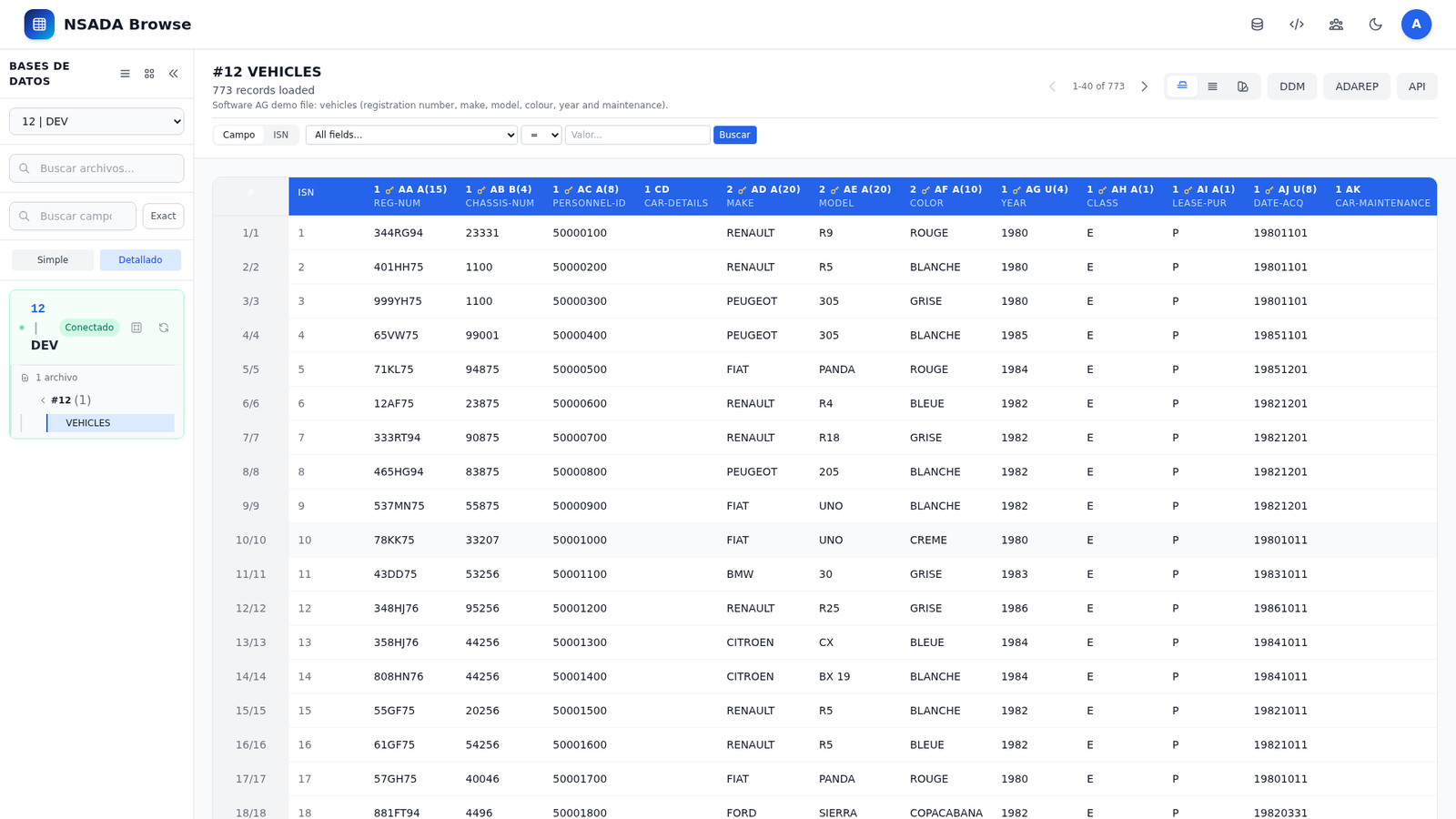
nsadaserver is Nacarsoft’s web explorer for Adabas files. It runs as a single Go binary that embeds the server, the web UI and a SQLite database for security; there is no separate frontend to deploy. It connects to the Adabas nucleus through the native client (CGO, -tags adalnk).
- Six views per file: table, form, JSON, DDM, ADAREP and API, plus an ER graph of relationships.
- Data and metadata: the DDM catalog is cached on disk; the file list and its definition can be browsed without a live connection, while the connection provides the physical name and record count.
- Create and operate: create physical files with ADAFDU from the browser, update and delete records by ISN, empty files and reconcile the catalog.
- REST API: the same endpoints the web UI uses, with an OpenAPI 3.0 specification, Swagger and API keys with scopes, expiry and usage auditing.
- Access control: users → groups → roles → per-file permissions (
read,write,delete), JWT, bcrypt, brute-force protection and daily auditing. - Multi-database: several Adabas databases in one instance, with a connection pool and idle auto-stop.
- Experience: 6 languages (ES, EN, FR, DE, IT, PT), light/dark theme and adjustable font size.
Database, file, field and data names in the examples are fictional.
Use cases
1. Quick record lookup without desktop tools
Find a specific record (e.g. fictional policy POL-2024-00123) from the browser, without installing the Adabas client on the desk.
./build/nsadaserver init /tmp/nsadaserver-demo
# → prints the random password for the admin user; keep it
./build/nsadaserver start /tmp/nsadaserver-demo
./build/nsadaserver status /tmp/nsadaserver-demo
# → nsadaserver is RUNNING (PID 12345)  Listening: http://0.0.0.0:11010
Web flow (http://localhost:11010): sign in as admin with the password printed by init; pick the DEV database in the side panel, open the file in the tree, search by field or by ISN and read the record in table, form or JSON view.
2. Explore the DDM/FDT/ADAREP structure before coding
Review a file’s fields, formats, descriptors and indexes (e.g. fictional FNR 100) before writing an integration or a Natural program.
./build/nsadaserver status /tmp/nsadaserver-demo # confirm RUNNINGWeb flow: select database and file in the tree; open the DDM view for the definition and its fields/indexes tabs; open ADAREP for the server’s real output; use the API view to get the equivalent REST call.
3. Give support read-only access to one database
Let the support team query the files in TEST without touching DEV or being able to modify records.
curl -s http://localhost:11010/api/health
# → {"service":"nsadaserver","status":"healthy"}
Web flow (as admin): Administration → Groups, Roles and Permissions; create a role with can_read on the TEST files (or * for all) and assign it to the user’s group. The user signs in and only sees the allowed files; any other operation returns 403.
4. Page through a large file under controlled limits
Walk a fictional history file with thousands of records without overloading the server or the Adabas connection.
./build/nsadaserver stop /tmp/nsadaserver-demo
# (tune pagination.page_size and pagination.read_limit in /tmp/nsadaserver-demo/config.yaml)
./build/nsadaserver start /tmp/nsadaserver-demo
Web flow: open the file in table view and page through it; the status bar shows the record count and ASO/DATA usage. On databases with a pool, the connection stops by itself after idle_timeout_minutes without access.
5. Create a new physical file with ADAFDU
Create a file for a new load without leaving the browser or using nucleus tools.
Web flow: click + in the database tree; enter the FNR and file name, description and default values; add fields with level, type, length, description and the NU, DE, UQ, PE, GR, MU flags; add superdescriptors if needed. NSAdaServer creates the file with ADAFDU, updates the local DDM and makes it visible with the role’s permissions.
6. Try the API from the panel itself
Consume and debug the API without leaving the application.
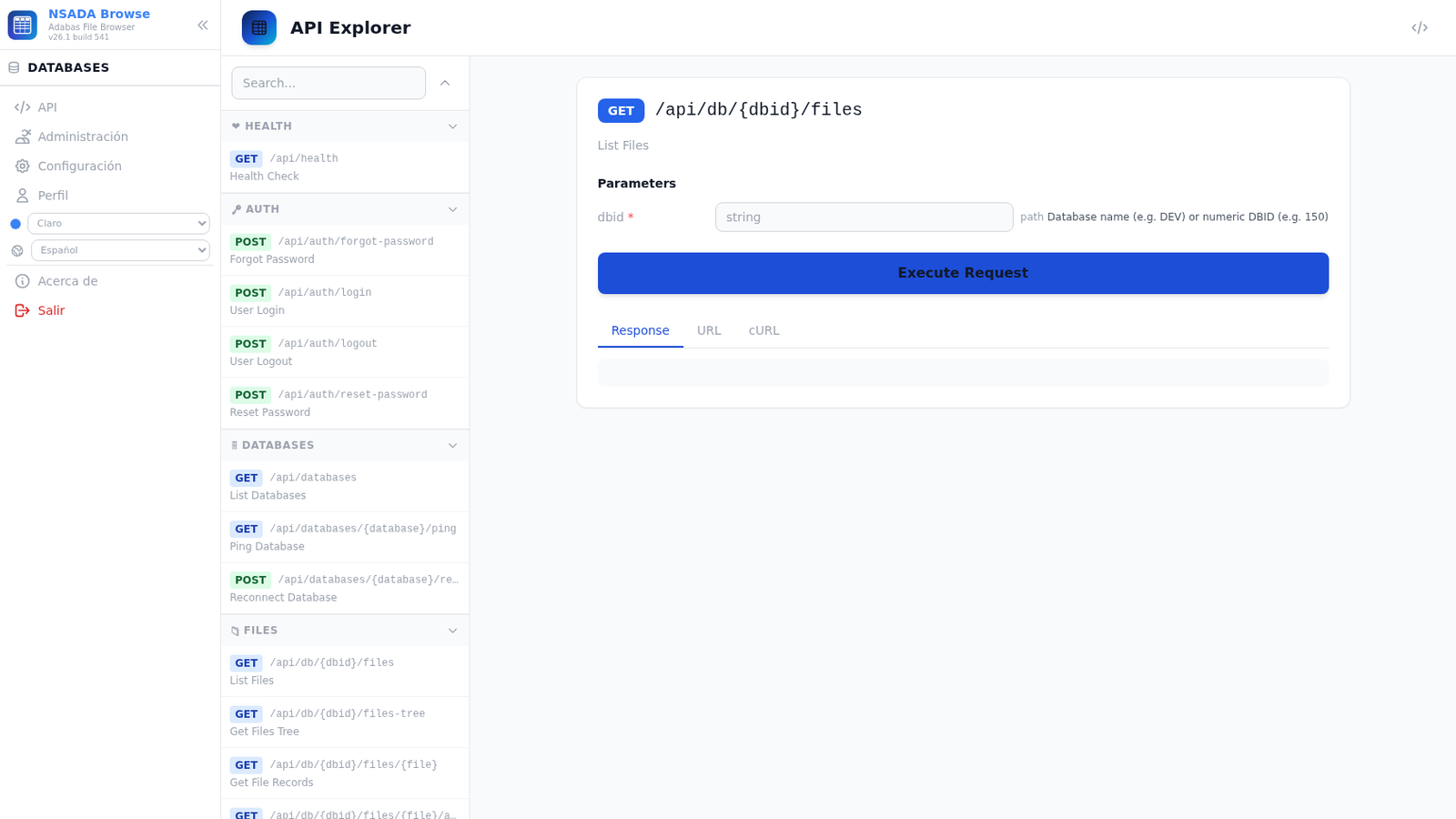
Web flow: open the API view; search for the endpoint (e.g. GET /api/db/150/files/100), fill in parameters and body, press Execute Request and check the Response, URL and cURL tabs. The OpenAPI 3.0 specification is at /api/openapi.json and the Swagger UI at /swagger/.
7. Integrate an ERP with an API key
Give an integration scoped access without sharing a user’s password.
Web flow: Administration → API Keys → create; enter a name, expiry in days (0 = never) and scopes. The full key is shown only once, at creation. The ERP sends it in X-API-Key or as Authorization: Bearer <key>; every use is recorded and the key can be revoked or reactivated.
8. Audit who queried or changed data
Review operations and configuration changes for a ticket or an internal audit.
Web flow: Administration → Users/Groups/Roles/Permissions and API Keys; the Configuration editor lets you review config.yaml and warns when a restart is required. Activity is written to audit/ with daily rotation, and failed logins go through the brute-force protection.
Interface
| Area | What it does |
|---|---|
| Login and recovery | Username/password authentication; JWT session; email recovery with a 6-digit code when SMTP is configured |
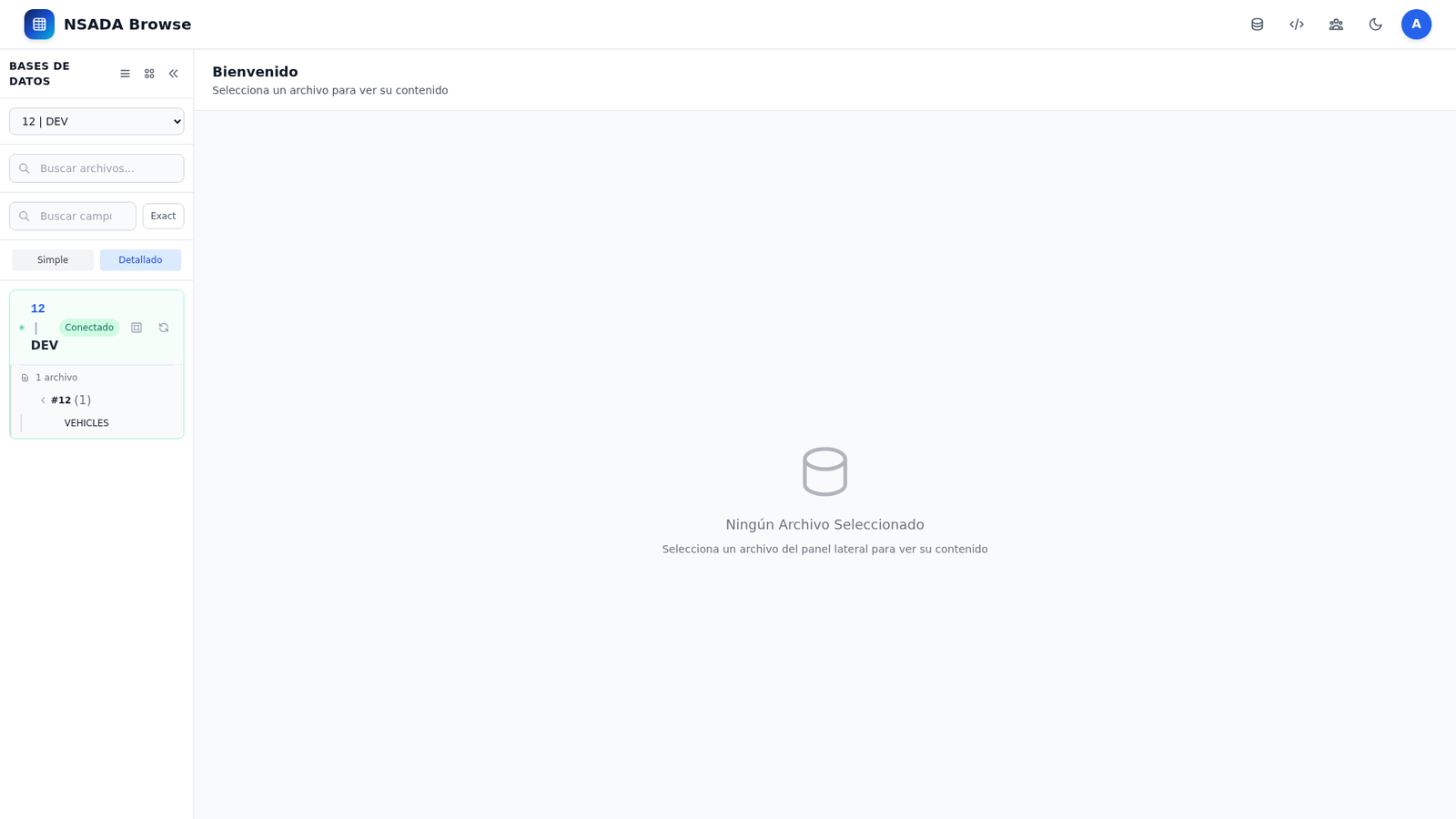
| Side panel / tree | Lists configured databases and their files with numbers; active-database selector, file search and create button |
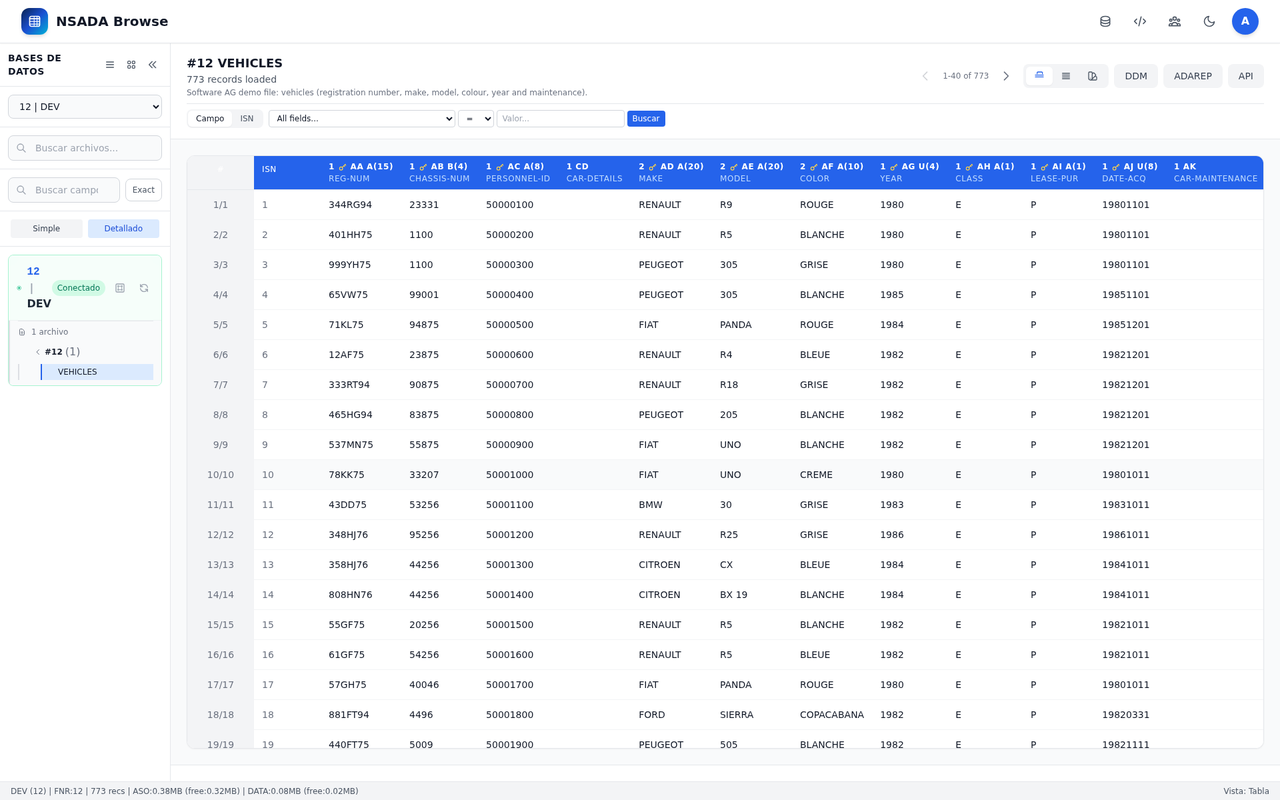
| Table view | Paged grid with the descriptor and ISN of every record |
| Form view | One record per form, with the DDM fields and their PE/GR/MU groups |
| JSON view | The same information as JSON, ready to copy or integrate |
| DDM view | Full definition: level, type, length, description, related fields and indexes |
| ADAREP view | The real output of the server’s ADAREP command |
| API view | The equivalent REST call, with response, URL and cURL |
| ER graph | Relationships between files from DDM fields, with a filter and PNG export |
| Search | By field (with operators) or by ISN, with sorting by descriptor and pagination |
| Administration | Users, groups, roles, per-file permissions and API keys |
| Configuration | config.yaml editor with the declared databases and a restart notice |
| Profile | Language, theme and password change |
| Status bar | Record count, ASO/DATA usage and database or pool status |
The six views of a file
| View | What it shows |
|---|---|
| Table | The file as a grid, with the descriptor and the ISN of every record |
| Form | One record per form, with the DDM fields and their PE/GR/MU groups |
| JSON | The same information as JSON, ready to copy or integrate |
| DDM | Full definition: level, type, length, description, related fields and indexes |
| ADAREP | The real output of the server’s ADAREP command |
| API | The equivalent REST call, with its response, URL and cURL |
Reference
Requirements
| Requirement | Detail |
|---|---|
| System | Linux (tested on RHEL 8/9 and Debian) |
| Adabas client | Native Adabas libraries for connectivity (CGO, -tags adalnk) |
| Port | 11010 by default, configurable |
| Reverse proxy | Recommended in production, with HTTPS |
| Browser | Modern browser; nothing to install on the desk |
CLI commands
| Command | Description |
|---|---|
init <dir> | Creates a new environment: config.yaml, db/security.db, logs/, audit/ and certs/. It does not overwrite an existing directory. It generates the JWT secret and Swagger key, and prints the random admin password |
start [dir] | Starts the server as a daemon (default: current directory). Writes .nsadaserver.pid next to config.yaml |
stop [dir] | Stops the daemon; it tries a graceful shutdown and forces exit if it does not finish |
restart [dir] | Restarts the daemon: stops it if running, then starts it again |
status [dir] | Shows PID, config file, listening URL, uptime and memory; exits 0 when running and 1 when not |
license [dir] | Shows the license status and machine fingerprint; exits 1 when the license is not valid |
version (--version, -v, -version) | Shows version, build, date, commit and license status |
run | Foreground server for debugging (internal; not listed in --help) |
--config <dir> | Sub-flag of the commands: sets the environment directory. Also accepted as a positional argument |
-server / -stop | Deprecated aliases of start and stop; they warn and still work |
--configdoes not work as the first argument:nsadaserver --config xanswersUnknown command. Usensadaserver start <dir>ornsadaserver start --config <dir>.The
adminpassword is not fixed:initgenerates a random one and prints it only once. Copy it before closing the terminal and change it on first login.
Main configuration (config.yaml)
| Key | Description |
|---|---|
server.host / server.port | Web interface and port (default 0.0.0.0:11010) |
server.tls_cert_file / tls_key_file | Optional TLS in the binary itself; leave empty when TLS is terminated at the proxy |
server.base_path | External prefix when published behind a proxy (e.g. /api/proxy/ABROWSE). Accepts several comma-separated values; empty = root |
database.path | Security SQLite (./db/security.db): users, groups, roles, permissions and API keys |
security.jwt_secret | JWT key (minimum 32 characters) — change it in production |
security.token_expiry_hours | Token lifetime (24) |
security.password_reset_code_ttl_minutes | Reset-code validity (10) |
adabas.dbid / config_file / files | Single-database configuration (legacy mode); connect is only supported inside adabas.databases.<name> |
adabas.databases.<name> | Declared databases: dbid, config_file, connect and files (FNR filter, e.g. "(100-120)") |
adabas.databases.<name>.pool | Connection pool: size_acc, size_upd, etid or etid_prefix, idle_timeout_minutes |
smtp.* | Mail for password reset (host, port, username, password, from, use_tls) |
pagination.page_size / read_limit | Page size and read cap. The example uses 80 and 10000; when omitted, the defaults are 20 and 1000 |
config.separator_decimal / daemon / logdir / logdays | Decimal separator, daemon mode, log directory and retention (7 days by default) |
audit_dir | Audit directory (./audit) |
swagger.enabled / api_key / title / version / description | REST documentation: enablement, explorer key and OpenAPI metadata |
Notes:
- If
adabas.databasesis empty, the legacyadabas.dbid/config_fileconfiguration is used. - A missing
poolkeeps the traditional shared-connection mode. In pool mode, non-positivesize_accandsize_updfall back to5and2;idle_timeout_minutes: 0means it never stops. etidandetid_prefixare mutually exclusive. The random prefix must be exactly 3 alphanumeric characters.fileslimits the visible FNRs of that database; it is independent of the per-file RBAC permissions.
DDM catalog
Each database declares its catalog in config_file: a JSON file with the file structure. The format is:
{
  "library": "SYSTEM",
  "files": [
    {
      "metadata": {
        "source_file": "DEMO-CLI.NSD",
        "ddm_name": "DEMO-CLIENTES",
        "db": "000",
        "file_number": 100,
        "record_type": "ADABAS",
        "total_fields": 21,
        "total_length": 654,
        "description": "Demo customer data"
      },
      "fields": [
        {
          "level": 1,
          "name": "AA",
          "field_name": "COD-CLIENTE",
          "format": "A",
          "length": "8",
          "descriptor": "D",
          "description": "Customer code"
        }
      ]
    }
  ]
}
The catalog is cached on disk: the file list and its definition are shown even when the Adabas connection is down; the connection only provides the physical information. POST /api/db/{dbid}/reconcile re-synchronises the catalog with the nucleus.
Permissions and API keys
users → groups → roles → per-file permissions (can_read / can_write / can_delete)| Aspect | Detail |
|---|---|
| Permission unit | The file, by DDM name or * for all |
| Operations | can_read, can_write, can_delete |
| Effect | File listings and records are filtered by permissions; an operation without permission returns 403 |
| Wildcard | * grants the permission to every file in the role |
| API keys | Name, optional expiry, scopes, revoke/reactivate and usage auditing. The full key is shown only once |
| User session | HS256 JWT; bcrypt passwords; lockout after failed attempts |
REST API
The OpenAPI 3.0 specification is served at /api/openapi.json and the Swagger UI at /swagger/. The web API Explorer uses the same specification and adds the session token.
Authentication:
- JWT:
Authorization: Bearer <token>afterPOST /api/auth/login. - API key:
X-API-Key: <key>orAuthorization: Bearer <key>. - The token is also accepted as
?token=in shareable explorer URLs.
| Method and path | Description |
|---|---|
GET /api/health | Service health |
GET /api/version / GET /api/license | Version/build and license status |
GET /api/settings / GET /api/languages | Pagination/language settings |
POST /api/auth/login / logout | Sign in and sign out |
POST /api/auth/forgot-password / reset-password | Recovery with a 6-digit code |
GET /api/databases | Databases with their files, status and pool |
GET /api/databases/{database}/ping | State of one database |
POST /api/databases/{database}/reconnect / stop | Reconnect or stop a database |
GET /api/db/{dbid}/files / files-tree | Files and tree of a database |
GET /api/db/{dbid}/files/{file} | Paginated records (page, page_size, last_isn) |
POST /api/db/{dbid}/files/{file}/search | Search with Adabas expressions |
GET /api/db/{dbid}/files/{file}/fdt / fdt-full / definition | Catalog FDT and live definition |
GET /api/db/{dbid}/files/{file}/adarep | ADAREP output |
GET /api/db/{dbid}/files/{file}/fields / count / stats | Fields, total and statistics |
POST /api/db/{dbid}/files | Create a physical file (ADAFDU) |
POST /api/db/{dbid}/reconcile | Reconcile the DDM catalog |
POST /api/db/{dbid}/files/{file}/empty | Empty a file’s records |
PUT/PATCH /api/db/{dbid}/files/{file} | Update a record by ISN |
DELETE /api/db/{dbid}/files/{file} | Delete a record by ISN |
DELETE /api/db/{dbid}/files/{file}/physical | Drop the physical file |
GET/POST/PUT/DELETE /api/admin/users|groups|roles|permissions | RBAC administration |
GET/POST /api/apikeys and /:id/{revoke,reactivate,scopes,name,audit} sub-routes | API keys, scopes and auditing |
# Authentication (use the password printed by init)
TOKEN=$(curl -s -X POST http://localhost:11010/api/auth/login \
  -H 'Content-Type: application/json' \
  -d '{"username":"admin","password":"<password-from-init>"}' \
  | sed 's/.*"token":"\([^"]*\)".*/\1/')

# Records of a file (DBID 150, FNR 100)
curl -H "Authorization: Bearer $TOKEN" \
  "http://localhost:11010/api/db/150/files/100?page=1&page_size=40"

# Search with an Adabas expression
curl -H "Authorization: Bearer $TOKEN" -H 'Content-Type: application/json' \
  -X POST http://localhost:11010/api/db/150/files/100/search \
  -d '{"query":"COD-CLIENTE=DEMO*","limit":20}'
Security and auditing
- User passwords with bcrypt and an HS256 JWT session.
- Email recovery with a link and a 6-digit code, with configurable expiry.
- Brute-force protection and a log of login attempts.
- Audit per operation (user, action and result) with daily rotation in
audit/. config.yamlis saved with0600permissions when edited from the application.- 30-day trial; machine-signed license at
$NS_HOME/licenses/nsadaserver.key.
Commented examples
# 1. New environment and startup (the directory must not exist)
./build/nsadaserver init /tmp/nsadaserver-demo
./build/nsadaserver start /tmp/nsadaserver-demo
./build/nsadaserver status /tmp/nsadaserver-demo

# 2. Two environments with the same binary
./build/nsadaserver init /tmp/nsadaserver-prod && ./build/nsadaserver start /tmp/nsadaserver-prod
./build/nsadaserver init /tmp/nsadaserver-dev  && ./build/nsadaserver start /tmp/nsadaserver-dev
./build/nsadaserver status /tmp/nsadaserver-prod
./build/nsadaserver stop /tmp/nsadaserver-dev

# 3. Restart after changing config.yaml
./build/nsadaserver restart /tmp/nsadaserver-demo

# 4. Verification: health, SPA, version and license
curl -s http://localhost:11010/api/health
curl -s http://localhost:11010/ -o /dev/null -w '%{http_code}\n'
./build/nsadaserver version
./build/nsadaserver license /tmp/nsadaserver-demo

# 5. Deprecated alias (works with a warning)
./build/nsadaserver -server /tmp/nsadaserver-demo
# API with a key (no user session)
curl -H "X-API-Key: $NSADASERVER_API_KEY" \
"http://localhost:11010/api/db/150/files/100?page=1&page_size=40"
# State of a specific database
curl -H "Authorization: Bearer $TOKEN" \
"http://localhost:11010/api/databases/DEV/ping"FAQ
What is the initial admin password? There is no fixed password. init generates a random one and prints it only once; keep it and change it on first login. If it is lost, use email recovery (when SMTP is configured) or create a new environment: init does not overwrite existing directories.
Where does the license go? At $NS_HOME/licenses/nsadaserver.key; if NS_HOME is not set, at /opt/ns/licenses/nsadaserver.key. Without a license there is a 30-day trial and nsadaserver license shows the machine fingerprint.
It won’t connect to Adabas? Check adabas.databases in config.yaml (dbid, connect, config_file and files) and network access to the nucleus. GET /api/databases/{database}/ping helps isolate the problem. On the server, check ldd build/nsadaserver and LD_LIBRARY_PATH if the native library is missing.
Why can’t I see any files? The DDM catalog may not be loaded, or the role may lack permission on those files. Check the config_file, that the JSON has files with its ddm_name, and the role’s can_read permissions (or the * wildcard).
Can I query without an Adabas connection? The file list and its DDM are read from the local cache; viewing records, ADAREP or statistics requires a live connection.
How do I access the API? From the web API view, with /api/openapi.json or with /swagger/. For integrations, create an API key in Administration → API Keys and send it in X-API-Key.
Which port does it use? 11010 by default. Change it in server.port; if it is taken, check with lsof -i :11010.
Which languages and themes are available? ES, EN, FR, DE, IT and PT; light/dark theme and adjustable font size. The manuals on this site are in Spanish and English, with an English fallback for the other languages.
Are the example data real? No: databases, files, fields, records and credentials in the examples are fictional.