
What is NSNatAPI
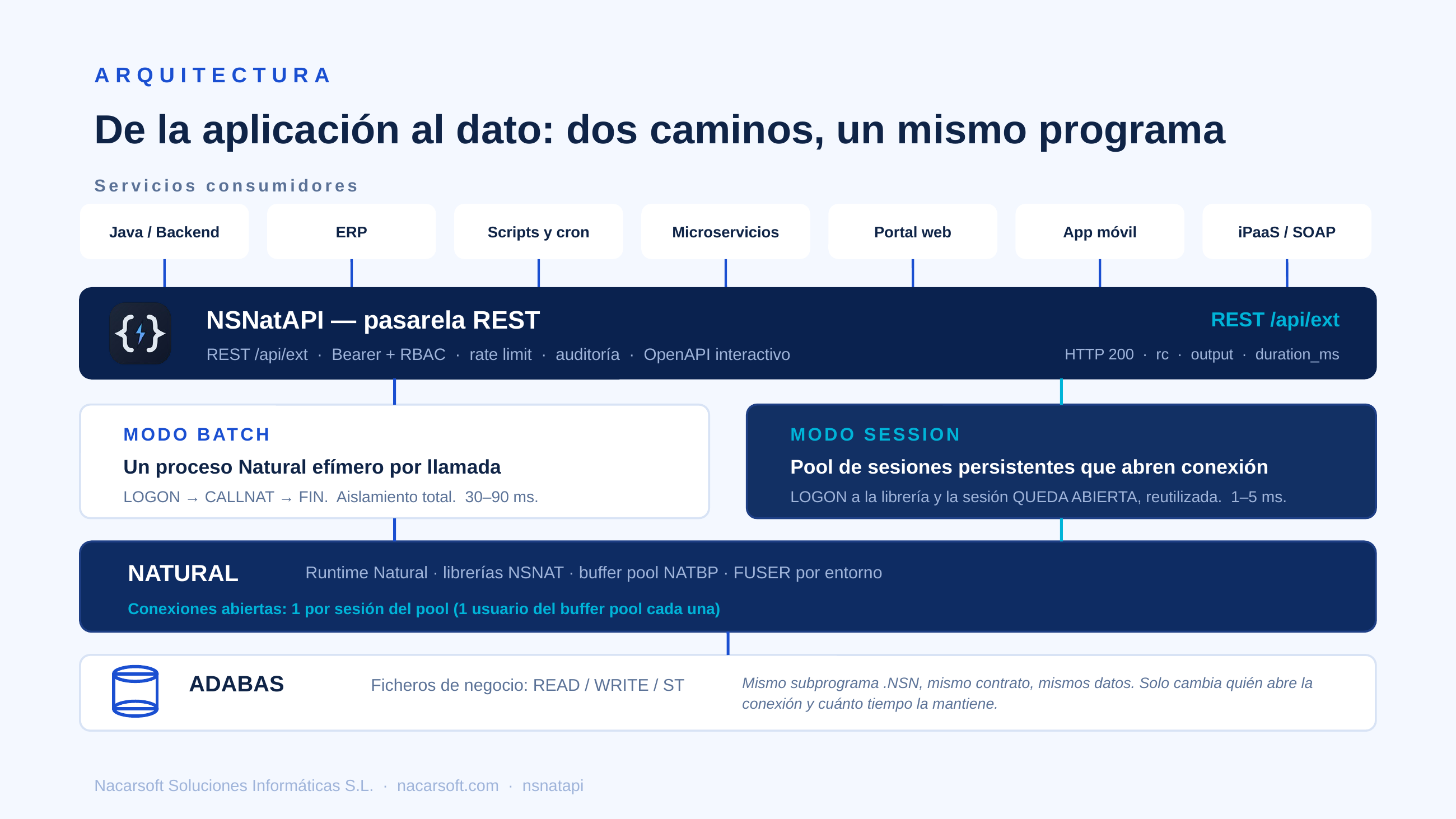
nsnatapi (NSNatAPI) is Nacarsoft’s gateway that exposes Natural subprograms as REST endpoints (GET/POST/PUT/DELETE) for machine clients (Java, scripts, cron, microservices), with no EntireX or RPC broker. Each endpoint is defined in the console, protected with Bearer tokens and runs in one of two modes:
- batch (default): one Natural process per call (~30–90 ms cold start).
- session (opt-in): a pool of reusable persistent Natural sessions (~1–5 ms per call) for high-frequency traffic.
Program names, hosts, tokens and accounts in the examples are fictitious.
Commercial deck: PDF (ES) · PPTX (ES) · PDF (EN) · PPTX (EN)
Requirements
- Linux (RHEL 8/9).
- Software AG Natural + Adabas client (
sagenv) with the buffer pool running. - FUSER with the business subprograms (read and write, to deploy).
- Reverse proxy with HTTPS in production.
Getting started
nsnatapi init ./data                 # config.yaml (0600), db, admin user
nsnatapi start ./data                # daemon, port 11032 by default
nsnatapi status ./data
Web console at http://host:11032/ (login admin; change the password after first access). The nsnatapi passwd command restores access.
Recommended order: 1) write the Natural subprogram, 2) create the endpoint, 3) press Deploy, 4) create the token with --endpoint <name> (that name must already exist).
The Natural module, step by step
The only code you write is the .NSN subprogram, following the house convention: exactly three parameters.
The minimal contract
0010* MIECHO - minimal echo (working template)
0020DEFINE DATA PARAMETER
00301 #PARM-IN  (A) DYNAMIC   /* input: one params line (<=240 chars) */
00401 #PARM-OUT (A) DYNAMIC   /* output: reply (see response modes) */
00501 #RESP     (I4)          /* 0 = ok, >0 = business error */
0060END-DEFINE
0070RESET #PARM-OUT #RESP
0080COMPRESS 'ECHO:' #PARM-IN INTO #PARM-OUT
0090END
What each parameter carries:
| Parameter | Direction | Content |
|---|---|---|
#PARM-IN (A) DYNAMIC | Input | A single line with the parameters, joined with the endpoint separator (max. 240 characters) |
#PARM-OUT (A) DYNAMIC | Output | The business reply (text, separated fields or JSON, depending on response_mode) |
#RESP (I4) | Output | 0 = ok; >0 = business error (the client receives it as rc) |
Mandatory rules
- Program name
A-Z0-9-_, max 8 characters, uppercase. - Always end with
END(neverSTOPorLOGON: they would kill the batch session). - Stateless per call: no globals/AIVs carried over between calls.
- Always close the unit of work:
END TRANSACTIONon success,BACKOUTif an update fails. - Deploy the
.NSNthrough your usual process (nsdeploy/SYSOBJH); nsnatapi never recompiles your programs, it only generates and compiles its stubs/drivers.
Example 1: lookup with a business RC
A GET /v1/saldo/:cuenta where the account travels in the input line and the program decides the result with #RESP:
0010* CPOLIZA - policy lookup (template)
0020DEFINE DATA PARAMETER
00301 #PARM-IN  (A) DYNAMIC
00401 #PARM-OUT (A) DYNAMIC
00501 #RESP     (I4)
0060LOCAL
00701 #CUENTA (A8)
0080END-DEFINE
0090RESET #PARM-OUT #RESP #CUENTA
0100MOVE #PARM-IN TO #CUENTA
0110* Your Adabas READ with your view/DDM goes here; if not found:
0120IF #CUENTA = '999999'
0130  MOVE 'ACCOUNT NOT FOUND' TO #PARM-OUT
0140  MOVE 4 TO #RESP
0150ELSE
0160  COMPRESS 'BALANCE 1234.56' INTO #PARM-OUT
0170  MOVE 0 TO #RESP
0180END-IF
0190END TRANSACTION
0200END
Call and response (response_mode=text):
curl -H "Authorization: Bearer nstm_..." \
     http://host:11032/api/ext/v1/saldo/001234
{ "ok": true, "rc": 0, "output": "BALANCE 1234.56", "duration_ms": 22 }For a missing account, HTTP is still 200 because the program ran; the business error travels in rc:
{ "ok": true, "rc": 4, "output": "ACCOUNT NOT FOUND", "duration_ms": 19 }Example 2: POST with two fields and a separator
A POST /v1/pagos with a JSON body. The values are joined into one line (importe|concepto) that the program splits:
0010* CPAGOS - payment entry (2 fields separated by |)
0020DEFINE DATA PARAMETER
00301 #PARM-IN  (A) DYNAMIC
00401 #PARM-OUT (A) DYNAMIC
00501 #RESP     (I4)
0060LOCAL
00701 #IMPORTE  (A15)
00801 #CONCEPTO (A60)
0090END-DEFINE
0100RESET #PARM-OUT #RESP #IMPORTE #CONCEPTO
0110SEPARATE #PARM-IN INTO #IMPORTE #CONCEPTO WITH DELIMITER '|'
0120IF #IMPORTE = ' ' OR #IMPORTE = ''
0130  MOVE 'MISSING IMPORTE' TO #PARM-OUT
0140  MOVE 1 TO #RESP
0150ELSE
0160  COMPRESS 'PAYMENT RECORDED|' #IMPORTE '|' #CONCEPTO INTO #PARM-OUT
0170  MOVE 0 TO #RESP
0180END-IF
0190END TRANSACTION
0200END
curl -H "Authorization: Bearer nstm_..." -H 'Content-Type: application/json' \
-d '{"importe":"1500","concepto":"prima"}' \
http://host:11032/api/ext/v1/pagos{ "ok": true, "rc": 0, "output": "PAYMENT RECORDED|1500|prima", "duration_ms": 31 }Example 3: real JSON output
If the endpoint uses response_mode=json, the program must emit valid JSON. Note: in this Natural environment a " literal in the source compiles to '; build quotes with H'22' (or use GENERATE JSON):
0010* JECHO - returns a JSON object (response_mode=json)
0020DEFINE DATA
0030PARAMETER
00401 #PARM-IN (A) DYNAMIC
00501 #PARM-OUT (A) DYNAMIC
00601 #RESP (I4)
0070LOCAL
00801 #Q (A1)
0090END-DEFINE
0100RESET #PARM-OUT #RESP
0110MOVE H'22' TO #Q
0120COMPRESS '{' #Q 'msg' #Q ':' #Q #PARM-IN #Q '}' INTO #PARM-OUT LEAVING NO SPACE
0130END
Response: output always carries the raw text and data the already-parsed object:
{
  "ok": true,
  "rc": 0,
  "output": "{\"msg\":\"hola\"}",
  "duration_ms": 24,
  "data": { "msg": "hola" }
}
If the program emits single quotes instead of double quotes, the call fails with 502 {"ok":false,"error":"invalid json from program"}.
Creating the endpoint, step by step
1. Endpoint fields
| Field | Required | Description |
|---|---|---|
name | Yes | Readable name (max. 64, no control characters) |
method | Yes | GET, POST, PUT or DELETE |
path_template | Yes | Starts with /; captures with :name (unique, letter-first, max. 32). E.g.: /v1/saldo/:cuenta |
library | Yes* | Natural library (uppercase). If omitted, the environment default library is used |
program | Yes | Existing subprogram (A-Z0-9-_, max. 8) |
environment | No | Natural environment (DEV/TST/PRD); empty = default environment |
fields_json | No | Extra fields in order: query on GET/DELETE, JSON body on POST/PUT. Format: [{"name":"importe","required":true}] |
separator | No | A single printable ASCII character (default |) |
exec_mode | No | batch (default) or session |
response_mode | No | text (default), fields or json |
response_fields_json | fields only | Name and type of each position: [{"name":"saldo","type":"number"}]; types: text, number, int, bool, json |
timeout_sec | No | Call timeout (0 = server default; configurable cap) |
Golden mapping rule: path captures (in order) + fields (in fields_json order), joined with the separator into one line. So if the parameter already travels in the path (:cuenta), fields_json must be []: don’t repeat it there, or you will additionally be asked for the same value as a query param.
2. Create in the console
Endpoints → Create: method, template, library, environment, program, fields, separator, timeout and execution mode. Press Deploy and then Try it to test it.
Quick example: GET, template /v1/saldo/:cuenta, library NSNAT, environment DEV, program CPOLIZA, fields_json [], mode batch.
3. Create via API (admin)
# Console login (stores the 'session' cookie)
curl -s -c cookies.txt -H 'Content-Type: application/json' \
  -d '{"username":"admin","password":"********"}' \
  http://host:11032/api/auth/login

# GET endpoint with a path capture (fields_json empty: the value already comes in :cuenta)
curl -s -b cookies.txt -H 'Content-Type: application/json' \
  -d '{"name":"saldo","method":"GET","path_template":"/v1/saldo/:cuenta",
       "library":"NSNAT","program":"CPOLIZA","environment":"DEV",
       "exec_mode":"batch","response_mode":"text","fields_json":"[]",
       "separator":"|","timeout_sec":30}' \
  http://host:11032/api/endpoints

# POST endpoint with two body fields
curl -s -b cookies.txt -H 'Content-Type: application/json' \
  -d '{"name":"pagos","method":"POST","path_template":"/v1/pagos",
       "library":"NSNAT","program":"CPAGOS","environment":"DEV",
       "exec_mode":"batch","response_mode":"text",
       "fields_json":"[{\"name\":\"importe\",\"required\":true},{\"name\":\"concepto\",\"required\":false}]",
       "separator":"|","timeout_sec":30}' \
  http://host:11032/api/endpoints

# Deploy (the id comes in the creation response)
curl -s -b cookies.txt -X POST http://host:11032/api/endpoints/1/deploy
4. Deploy: what nsnatapi compiles
- batch: Deploy generates and compiles a
NX000042stub (reporting mode) in the environment library. The stub doesINPUT,CALLNAT '<your-program>'and writes the reply with theNSNAT:OUT:<len>/NSNAT:C:<len>:<chunk>/NSNAT:END RC=<n>sentinels. - session: Deploy compiles the shared
NSRPDRVdriver (structured mode) once per library; the pool reuses it and dispatches to your subprograms with dynamicCALLNAT.
Your .NSN files don’t change between modes. Don’t hand-edit the NXnnnnnn files: they are regenerated on every Deploy.
5. Scoped token
nsnatapi token ./data --name java-prd --endpoint saldo --days 365 \
    --cidr 10.0.0.0/8,192.168.1.10
# → nstm_xxxxxxxx…  (store it; it is shown only once)
nsnatapi token ./data --list
Without --endpoint, the token is valid for all endpoints. You can restrict by IP/CIDR, expiry and revocation, plus per-token rate limiting.
The secret is shown only once, at creation (with a Copy button in the console); afterwards it is unrecoverable —only its hash is stored— so if it is lost you rotate it from the console (Rotate button) or with POST /api/tokens/:id/rotate: same id and metadata, new secret, the old one stops working.
Handing a token to an application: 1) deployed and tested endpoint; 2) one token per app, minimal scope, expiry and CIDRs when applicable; 3) fill in the contact e-mail and the app sends a notice with a Get token button: a single-use link (48 h) showing the secret once (resendable with ✉️); 4) copy the secret once, straight into the app’s secret store (never notepad or e-mail); 5) verify with a test call under Calls; 6) on loss or leak, rotate; when the app is decommissioned, revoke.
How the params line is built
| Case | Where each value comes from | Example |
|---|---|---|
GET /v1/saldo/001234, fields_json: [] | :cuenta capture | 001234 |
GET /v1/saldo/001234?formato=corto, fields: [formato] | Capture + query | 001234|corto |
POST /v1/pagos, body {"importe":"1500","concepto":"prima"}, fields: [importe, concepto] | Body in order | 1500|prima |
PUT /v1/saldo/001234, body {"importe":"1500"} | Capture + body | 001234|1500 |
The default separator is | and must be a single printable ASCII character. The total line must not exceed 240 characters or contain line breaks.
JSON responses
All machine calls use /api/ext/... with Authorization: Bearer nstm_....
text mode (default)
Only output with the program’s raw text:
{ "ok": true, "rc": 0, "output": "BALANCE 1234.56", "duration_ms": 22 }fields mode: typed object plus the raw text
The program returns separated positions (123456|Juan Pérez|1520.75|ACTIVA) and the endpoint declares response_mode: fields with:
[{"name":"cuenta","type":"text"},{"name":"titular","type":"text"},
 {"name":"saldo","type":"number"},{"name":"estado","type":"text"}]
Response:
{
  "ok": true,
  "rc": 0,
  "output": "123456|Juan Pérez|1520.75|ACTIVA",
  "duration_ms": 22,
  "data": {
    "cuenta": "123456",
    "titular": "Juan Pérez",
    "saldo": 1520.75,
    "estado": "ACTIVA"
  }
}
json mode: validated object
The program emits JSON (see the JECHO example above) and the response includes the object in data. If it isn’t valid JSON: 502 {"ok":false,"error":"invalid json from program"}.
Errors: common shape
All machine errors share one shape:
{ "ok": false, "error": "<message>" }| HTTP | Example error | Meaning |
|---|---|---|
| 200 | n/a (rc: 4, output: "ACCOUNT NOT FOUND") | It ran; the business says no |
| 400 | missing param cuenta | Missing required field (query or body) |
| 400 | json body required / invalid json body | POST/PUT without a valid JSON body |
| 400 | params too long (max 240 chars) | Param line too long |
| 401 | invalid token | Missing, revoked or expired token |
| 404 | no such endpoint | No active endpoint with that method + path |
| 429 | rate limit exceeded | Per-token/IP limit reached |
| 502 | natural execution failed | Natural failed (detail in the call log) |
| 502 | invalid json from program | response_mode=json but the output isn’t JSON |
| 503 | endpoint not deployed | Stub/driver Deploy missing |
| 503 | server too busy, try again later | Concurrency or session pool saturated |
| 504 | natural call timed out | The program exceeded timeout_sec |
Calling from clients
# GET with a path capture
curl -H "Authorization: Bearer nstm_…" \
     http://host:11032/api/ext/v1/saldo/001234

# POST with a JSON body (fields defined on the endpoint)
curl -H "Authorization: Bearer nstm_…" -H 'Content-Type: application/json' \
     -d '{"importe":"1500","concepto":"prima"}' \
     http://host:11032/api/ext/v1/pagos
Minimal Java client (Java 11+, no dependencies; full example in the project’s examples/java/NatApiClient.java):
var req = HttpRequest.newBuilder(URI.create(base + "/api/ext/v1/saldo/001234"))
    .header("Authorization", "Bearer " + token).GET().build();
var body = client.send(req, BodyHandlers.ofString()).body();
// {"ok":true,"rc":0,"output":"BALANCE 1234.56","duration_ms":22}
// HTTP 200 = executed (even rc≠0); always check rc.
API reference
Sources of truth: api/openapi.yaml (English) and api/openapi.es.yaml
(Spanish), OpenAPI 3.1, in the project. The app serves them at /api/docs
(interactive Swagger UI, with a Try it out button),
/api/openapi.json and /api/openapi.yaml, with ?lang=es|en or
Accept-Language negotiation. It covers the Machine API (/api/ext/*,
Bearer) and the Console API (/api/*, session cookie), with the RBAC
permission (x-permission) of each operation and curl samples.
Additionally, every active endpoint shows up as its own operation (its
real template, method and parameters): developers see what is available, how
to call it, what it returns, and can try it with their token (fill it in at
the top or pass ?token=nstm_…).
Visibility (hot-reloaded, config.yaml or Configuration → API docs):
apiDocs:
  access: private   # public (no login) | private (console session) | off (404)
Full usage guide (auth, conventions, pagination, errors, versioning):
nsnatapi/doc/api.md.
Console: dashboard, e-mail and sessions
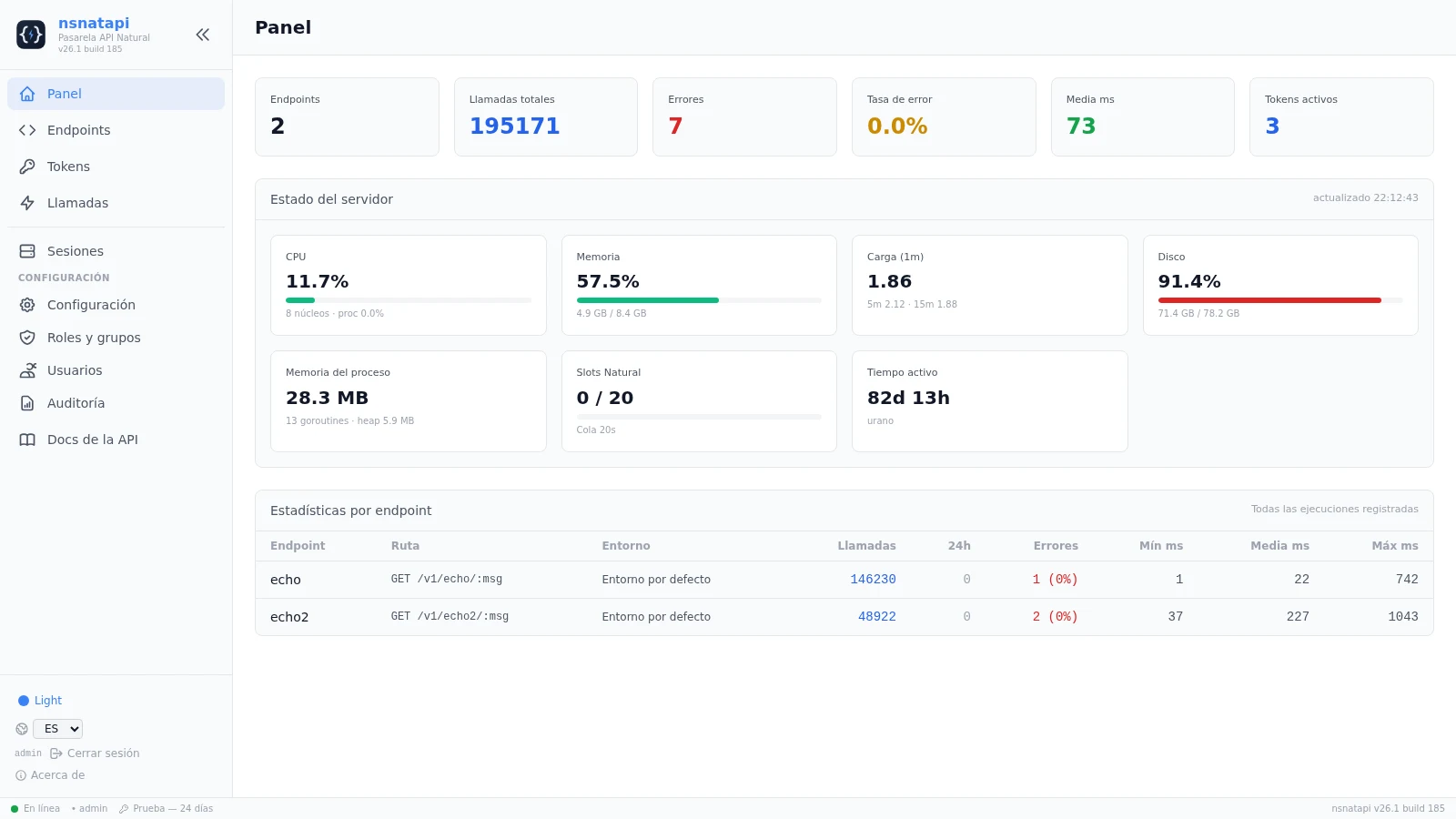
The Dashboard shows live server telemetry (CPU, memory, load, disk, process RSS/heap/goroutines, Natural slots in use and uptime), sampled from /proc with no external dependencies and refreshed every 5 s from GET /api/system/stats (admin only).
The correo section (SMTP or sendmail, with a Test email button) enables password recovery: Forgot password? sends a single-use link (60 min); unknown addresses always get the same generic response (no user enumeration). The SMTP password can come from an env var (NSNATAPI_SMTP_PASSWORD).
Console sessions rotate the refresh token on every use with reuse detection (a replayed token revokes every session); users.token_version invalidates everything on password change/reset or forced logout. On top: auth.tokenPepper (HMAC for API tokens), automatic Secure cookies, server.trustedProxies (loopback by default) for IP integrity in auditing and brute-force protection, and generic client errors.
Endpoints and modes
- batch: clicking Deploy generates and compiles a
NX000042stub (reporting mode) in the environment library. - session: Deploy compiles the shared
NSRPDRVdriver (structured mode) once per library; the pool reuses it.
Parameter mapping: path captures (in order) + fields (query on GET/DELETE, JSON body on POST/PUT), joined with the separator into one line.
Persistent sessions
natural:
  numSessions: 4            # pool size per (environment, library)
  maxSessions: 16           # cap (real limit is NATBP MAXUSERS)
  sessionIdleSec: 600       # close sessions idle > 10 min (0 = off)
environments:
  DEV: { bp: NATBP, numSessions: 6 }
  TST: { bp: NATTST, numSessions: 2, sessionIdleSec: 300 }
Each session is a Natural process (it consumes a buffer-pool user; leave headroom in MAXUSERS). A fatal error recycles the session automatically.
Avoiding NAT3009: a persistent session that opened Adabas can expire due to non-activity (TNAA/TNAE/TNAX) and the next call fails with NAT3009 (subcode 3). With sessionIdleSec the session is closed before it expires (must be below the effective TNAE, with margin): the next request spawns a fresh session with a new Adabas connection, so the 3009 never happens. The close is recorded in the server log (recycled by idle timeout) and in the audit log (SESSION_IDLE_TIMEOUT), and counted per pool (recycled_idle).
Base vs environments: environments is the source of truth and each environment is self-contained. The top-level natural block is only the base defaults (it pre-fills new environments and acts as a fallback when none is defined); it is not an environment. defaultEnvironment picks the environment used when an endpoint does not specify one.
It is configured in the console, Configuration → Natural environments: the Session pool size (numSessions) field sets the default and each environment’s modal sets its own (the environment value overrides the global; it is the number Pre-warm spawns). The change applies live: the pool is resized (shrinking recycles surplus idle sessions). Pools are separated by environment (e.g. 3 sessions in DEV and 8 in TST, each with its own values); an endpoint with no explicit environment uses the default one. The Sessions page labels each pool with its environment and the call log records the environment (column and Environment filter in Calls). The Natural RPC session pools panel (Configuration) lists all environments and lets you New pool (per library), Edit limits, Pre-warm, Restart and Delete. Via API: GET /api/natural/sessions, POST /api/natural/sessions/warm|restart|delete; counters are also in GET /api/system/stats → natural.sessions.
The Sessions page (admin, auto-refresh every 5 s) shows each live Natural session: PID, state (idle/busy/dead), uptime, last call, calls served (transactions proxy), errors, last program, latencies (last/avg), instantaneous and average CPU (%), and memory (RSS), with Pre-warm / Restart / Kill session actions.
Usage examples
1. Quick endpoint setup (console)
Endpoints → Create: method GET, template /v1/saldo/:cuenta, library NSNAT, program CPOLIZA, environment DEV, mode batch, fields_json []. Click Deploy to compile the stub and Try it to test it.
2. The same setup via API (admin)
See “Create via API” above: fields_json stays empty because the value already travels in the :cuenta capture.
3. Session-mode endpoint (high frequency)
curl -s -b cookies.txt -H 'Content-Type: application/json' \
  -d '{"name":"saldo-session","method":"GET","path_template":"/v1/saldo-session/:cuenta",
       "library":"NSNAT","program":"CPOLIZA","exec_mode":"session",
       "fields_json":"[]"}' \
  http://host:11032/api/endpoints

# Deploy compiles the NSRPDRV driver (once per library)
curl -s -b cookies.txt -X POST http://host:11032/api/endpoints/2/deploy
4. Scoped API token with allowlist
See “Scoped token” above (create first the endpoint whose name you pass in --endpoint).
5. Client that distinguishes rc from HTTP
var body = client.send(req, BodyHandlers.ofString()).body();
// HTTP 200 + {"ok":true,"rc":4,"output":"ACCOUNT NOT FOUND",...}
// → not a technical failure: the business says the account does not exist.
6. Observability
# Per-endpoint metrics (admin, console cookie)
curl -s -b cookies.txt http://host:11032/api/stats | jq '.[] | {endpoint_id,calls,errors,avg_ms}'
# Session pool occupancy
curl -s -b cookies.txt http://host:11032/api/system/stats | jq '.natural.sessions'
# Calls filtered by library (the Calls page shows Environment, Library and PID)
curl -s -b cookies.txt 'http://host:11032/api/calls?library=NSNAT' | jq '.items[] | {environment,library,exec_mode,session_pid,http_status}'
Configuration (config.yaml)
| Block | Key | Description |
|---|---|---|
server | host / port / trustedProxies | Listen (default 0.0.0.0:11032) and trusted proxies |
database | path | SQLite (RBAC, endpoints, tokens, auditing) |
auth | jwtSecret / jwtExpiryMin / cookieName / tokenPepper / secureCookies | Console session and token hashing |
natural | naturalBin / sagenv / bp / natparm / fuserDbid / fuserFnr / fuserPath / numSessions / maxSessions / sessionIdleSec | Default environment |
defaultEnvironment | <DEV/TST/PRD> | Environment used when an endpoint does not name one |
environments | <DEV/TST/PRD> | Per-environment overrides (inherit from natural) |
exec | defaultTimeoutSec / maxTimeoutSec / maxConcurrent / queueTimeoutSec / ratePerMin / callRetentionDays / maxBodyBytes / maxOutputBytes | Execution limits |
correo | mailer, host, port, … | E-mail delivery (password reset, token notices) |
logging | dir / maxSizeMB / maxAgeDays / maxBackups / compress | Log rotation |
license | trialDays | Trial days when there is no license.key |
apiDocs | access | Spec visibility: public / private / off |
updates | url | Reserved: stored and editable, but no component consumes it today |
Everything can also be edited from the console (Configuration, admin only).
Applied immediately: timeouts, concurrency, queue, environments and
apiDocs.access. A restart is required for server.host, server.port,
database.path, auth.cookieName, logging.dir and auth.jwtSecret (the
page reports which). The rate limit (exec.ratePerMin) is read at
start-up, so a change only takes effect after the next restart.
Security
- Per-endpoint Bearer tokens with scope, expiry, revocation and IP allowlist (
--cidr), plus per-IP and per-token rate limiting. - Console with JWT, bcrypt, TOTP 2FA and RBAC; refresh-token rotation with reuse detection.
- Roles and groups: permissions are granted to roles, groups attach a role and users belong to groups (permissions = union). Catalog:
dashboard,endpoints,tokens,calls,sessions(eachview/manage),users,config,logs. Roles & Groups page; the system group Administrators holds every permission andinitputs theadminuser in it. - Password recovery: in Users, Reset link generates a single-use link (60 min) and e-mails it; if mail is not configured or delivery fails, the console shows the reason and copies the link for manual delivery.
- Strict validation of every value reaching Natural or the FUSER; no shell with user data; no path traversal.
- Auditing of every call (metadata only, never bodies); configurable retention.
Troubleshooting
| Symptom | Likely cause |
|---|---|
502 protocol: missing OUT sentinel | Stub not deployed or the program does not return control (STOP, loop) |
502 natural execution failed | Natural error; check the call log |
Session: session boot timeout | Missing NSRPDRV driver or library/fuserPath/bp unresolved |
Session: session error (RC=935) | DEFINE DATA PARAMETER signature does not follow the convention (3 parameters) |
503 server too busy / no free Natural session | Concurrency or pool saturated: raise maxConcurrent/numSessions |
504 timeout | Program takes longer than timeout_sec |
502 invalid json from program | The program emits single quotes: use H'22' (or GENERATE JSON) for JSON double quotes |
400 missing param X | Required field without a value (query on GET/DELETE, body on POST/PUT); check path captures are not duplicated in fields_json |
400 params too long (max 240 chars) | Too many fields or values too long for one line |
Limits (framing v2)
Input: one params line (≤240 characters per INPUT). Output: long replies (>240) are transmitted framed (v2: NSNAT:OUT:<len> + NSNAT:C:<len>:<chunk>×N + NSNAT:END RC=<n>), so the 240 WRITE per-line cap does not apply to the full payload; the real output cap is exec.maxOutputBytes (1 MB). Per-endpoint timeout (default 60 s, cap 300 s), configurable concurrency and per-token rate limit.
Quick reference
| Command | Description |
|---|---|
nsnatapi init [dir] | Create configuration, database and admin user |
nsnatapi start|stop|status [dir] | Service lifecycle |
nsnatapi token [dir] --name X --endpoint Y --days N [--cidr ...] | Create an API token (endpoint Y must exist) |
nsnatapi token [dir] --list | --revoke <prefix> | List or revoke tokens |
nsnatapi passwd [dir] <user> [password] | Reset a console password (generated when omitted) |
nsnatapi license [dir] | Show the license status (exit code 1 if invalid) |
nsnatapi --help | Help and global flags |