
What is NSNatIDE
nsnatide (NSNatIDE) is Nacarsoft’s web IDE for programming in
Natural from the browser. It brings a modern editor (Monaco, the one behind VS
Code) together with the usual Natural operations: browse libraries and objects,
edit, compile (STOW) and run programs, with integrated Git version control
and an AI assistant. It also ships software across environments with
SYSOBJH packages and audited, traceable deployment.
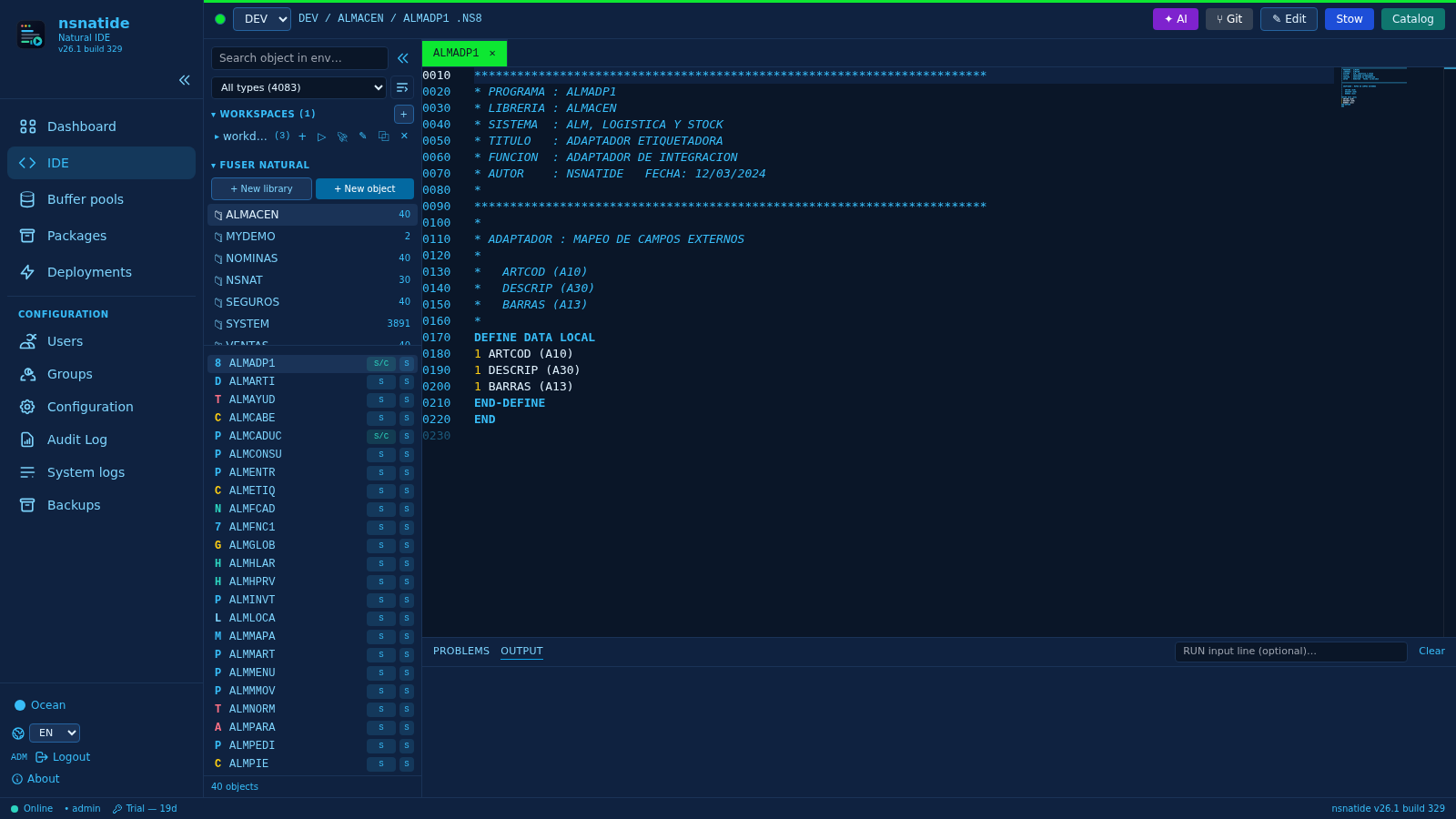
Library, program and user names in the examples are fictitious.
Key features
- VS Code–style editor (Monaco): Natural syntax highlighting, automatic
sequence numbering, completion of variables (
#VAR),VIEW OF(DDM) fields,USING(data areas),INCLUDE, system variables and keywords; hover, go to definition and diagnostics for undeclared variables. - FUSER explorer: libraries and objects read from
FILEDIR.SAG, search across all libraries, type filter, S/C (source and/or cataloged) and mode badges, and full properties (dates, sizes, permissions, owner). - Edit and compile every type with source (P N S M C D L G A H T), with STOW
errors highlighted (code, line and message via
LASTMSG). - Structured editors for DDM, data areas (Local/Global/Parameter) and maps (MAP2) with screen preview and text view.
- AI assistant: generate, complete, explain/document and fix compile errors, grounded in the library’s symbols and DDMs.
- Integrated Git: status, diff, commit, history and push/pull to a remote.
- CATALL with a detailed report and open the failing object in the editor.
- Dashboard: packages by status, deployment charts, success rate and upcoming scheduled deployments.
- SYSOBJH packages and deployment: ship software across environments with a pre-deploy snapshot, rollback, immediate or scheduled deployment, and full auditing.
- Snapshot backups: hybrid per-environment backup (recent hardlinks + compressed monthly tar) with instant module recovery, diff and optional STOW.
- Remote environments: manage other machines’ FUSERs over SSH from the same UI: edit, stow/run, Git and backups.
- Multi-environment DEV/TST/PRD, per-environment/library RBAC and auditing.
- Console in Spanish and English and 6 UI themes.
Requirements
- Linux (RHEL 8/9).
- Software AG Natural + Adabas client (
sagenv) with the buffer pool running. - One FUSER per environment with the layout
<FUSER>/<LIB>/{FILEDIR.SAG,SRC,GP}. gitin the service PATH for version control (optional).- Reverse proxy with HTTPS in production.
Startup
# Initialise (config.yaml 0600, db, admin user) and start
./nsnatide init ./data
./nsnatide start ./data
./nsnatide status ./data
./nsnatide stop ./data
Web console at http://host:11033/ (login admin; change the password after the
first sign-in). nsnatide passwd recovers access.
Configuration
Environments (FUSER)
Each environment points to a FUSER directory; empty fields inherit the global
natural section:
natural:
  naturalBin: "/opt/softwareag/Natural/bin/natural"
  sagenv: ". /opt/softwareag/sagenv"
  bp: "NATBP"
  ftouchBin: "/opt/softwareag/Natural/bin/ftouch"
  fuserDbid: "22"
  fuserFnr: "20"
  fuserPath: "/data/ns/fusers/dev"

environments:
  DEV:
    fuser: "/data/ns/fusers/dev"
  TST:
    fuser: "/data/ns/fusers/tst"
Remote environments (SSH)
Beyond local FUSERs, NSNatIDE manages environments hosted on another machine through the same UI: editing, run/stow, Git and backups run on the remote transparently.
environments:
  PRD:
    remote: true
    server: "prd.example.com"
    user: "natural"
    port: 22
    sshKey: "/home/sag/.ssh/id_ed25519"  # key path or contents
    agentBin: "nsnatide"                 # binary on the remote (or absolute path)
    fuser: "/data/ns/fusers/prd"         # FUSER path ON the remote server
The primary instance is the single control plane (users, RBAC, audit) and
talks over SSH to the remote headless agent (nsnatide agent: no open
ports, no extra authentication). The + environment button asks for the key
and the FUSER path (the remote server’s path for SSH environments). Security:
key in config.yaml (0600) or by path, BatchMode/IdentitiesOnly, host key
accept-new, SSH multiplexing (ControlMaster) and path confinement to the
FUSER.
The SSH access wizard (Acceso SSH button) simplifies setup: it shows
the target, asks for the password once, generates an ed25519 keypair, installs
the public key in the remote authorized_keys and stores sshKey; from then
on everything goes over key auth. To reuse your SSH agent, use sshAgent
(SSH_AUTH_SOCK socket); with an empty sshKey the system SSH is used as-is
(~/.ssh/config and default keys).
The remote needs an up-to-date agent: the binary itself or the static
nsnatide-agent (no CGO/SQLite, for older glibc). The Deploy agent
button uploads it to the server (keeping a .prev copy), verifies the
checksum and pings the version (POST /api/remote/deploy-agent); use it after
every nsnatide upgrade.
Each environment has an Active toggle (inactive = hidden from the IDE, its operations rejected) and its own color (indicator by the selector and tab backgrounds).
Configuration UI (/config)
A section sidebar (Server, Correo, License, Editor, AI,
Git, Environments) with a stacked form. Changes are written to
config.yaml and applied hot. Each section has a contextual test button:
Test Email, Test AI and Test Git.
AI (optional)
ai:
  enabled: true
  provider: "opencode-go"      # openai | openrouter | opencode-go | ollama | anthropic | google
  model: "deepseek-v4-pro"
  api_key: "CHANGE_ME"         # or AI__API_KEY
  timeoutSec: 120
  maxConcurrent: 3
Git (optional)
git:
  enabled: true
  repoMode: "environment"       # one repository per FUSER
  autoCommit: "off"
  authorFallback: "nsnatide <nsnatide@localhost>"
  ignore: ["**/GP/", "**/FILEDIR.SAG", "**/*.bak"]
  remotes:
    DEV:
      name: "origin"
      url: "https://github.com/acme/natural-dev.git"
      auth: "token"             # none | token | ssh
      username: "x-access-token"
      token: "CHANGE_ME"        # or GIT_REMOTE_DEV_TOKEN
      branch: "main"
Usage
Explorer and editor
- Environment selector → libraries (
FILEDIR.SAGfirst) → objects with a type badge. The filter searches every library in the environment; a second filter by type narrows the list. - Save (
Ctrl+S) writes toSRC/; Stow saves +ftouch+ compiles; Run (F8) executes programs and showsCMPRINTin the Output panel. Buttons appear contextually: Save only with unsaved changes, Stow while editing an editable module, Run only while editing a Program. - If a program uses
INPUT, running it opens a dialog for one line perINPUT(avoidsNAT6016).
Structured types
Opening a DDM (.NSD), data area (.NSL/.NSG/.NSA) or map (.NSM)
shows a structured grid editor (add/remove fields, HD=, superdescriptors,
INIT, attributes, screen preview) plus a View as text button. Type A is a
Parameter data area.
AI assistant
The ✦ AI button in the top bar offers Generate, Complete, Explain,
Document and Fix with AI (using the STOW LASTMSG). The + Object
dialog has a Generate with AI checkbox to create the source from a
description. Review the proposal and Apply it to the editor (left unsaved).
Git
The ⑂ Git button shows the branch and ahead/behind, Staged/Changes files
with stage/unstage/discard, a message + Commit, History with the patch,
and a Monaco diff. The Remote block provides Fetch / Pull / Push and
⚙ Configure remote (URL, token/ssh, branch). Commits are authored by the
application user.
CATALL
Right-click a library → Catalog library (CATALL): choose object types
(all by default) and a name filter (* by default); a report shows cataloged
objects, errors and duration. Every failing object has an Open button that
takes it to the editor.
Packages and deployment (SYSOBJH)
The Packages page ships software across environments: create the package, add objects from the source libraries (one by one or in batch, with reordering), generate the SYSOBJH (files, report and downloadable bundle) and deploy to the target environment immediately or on schedule.
Every deployment takes a pre-deploy snapshot of the target (enables
rollback), runs LOADALL + CATALL and cleans the buffer pool. The
Deployments page lists the history with status, report and one-click
rollback; everything is audited (DEPLOY_*, with optional email).
Permissions packages create|read|update|delete|deploy and deployments read|delete. In this phase only local target environments are supported.
Deployment can be immediate or scheduled (a specific date/time or the
package’s default cron window). From Deployments you can cancel a
pending deployment and roll back a completed one (restores the pre-deploy
snapshot). On completion an email notification is sent (natNotify +
notifyEmails in the configuration).
Dashboard
The Dashboard page summarizes distribution activity: packages by status, 12-month and 14-day deployment charts, 30-day success rate, per-environment totals, upcoming scheduled deployments and recent history.
Buffer pools
The Buffer pools page shows per-environment status (Started / Stopped /
Unknown) with Status (natbpmon status), loaded Modules (dir with an
optional pattern), Delete entries by pattern, Stop and Start. The
bufferpool view (bpview role) and bufferpool manage (bpmanager role)
permissions apply; on remotes it operates via the agent.
Copy and compare
Right-click a library → Copy library (pick target environment and name;
copies SRC/GP/FILEDIR, regenerates the FILEDIR and cleans the extra buffer
pools; works on the same host and across hosts over SSH). Copying inside the
same environment needs ide save; across environments, ide copy (copy
role). LIB_COPY auditing.
Compare library/object shows per-object status (same, source_diff,
catalog_diff, type_diff, mode_diff, only_a/b) with raw-source SHA-256;
clicking an object opens its side-by-side diff in an editor tab. Only ide read on both sides is required.
Editor details
Preview tabs (single click = reusable preview; double-click or editing pins
it; ● marks unsaved changes), optional Vim mode, an ✎ Edit button
(Find/Replace/Go to line), a per-object Properties window (dates, sizes,
permissions, owner) and a Problems/Output panel (clickable STOW errors that
jump to the line). Text objects can be saved but not compiled (text objects cannot be stowed).
Workspaces
A Workspaces section above the libraries: per-user named sets of live
environment/library/module references. Click opens in preview, + adds the
active tab’s module, ▷ opens everything pinning tabs; with rename, duplicate,
delete and cleanup of modules that no longer exist.
Backups (snapshots)
A hybrid per-environment model (environments.<ENV>.backup) with two
retention tiers:
- Recent snapshots: FUSER copies via hardlinks — they only occupy what
changed, take seconds and are fully browsable. Kept for
snapshotDaysdays (e.g. 30) and the basis for instant module recovery. - Monthly tar archive: snapshots older than
snapshotDaysare consolidated into a single compressed tar per month (tarDir,tarFormat: tar.zst|tar.gz) and the trees are removed. Tars are kept forretentionYearsyears (e.g. 5); past that they are moved toarchiveDiror deleted.
Automatic scheduling: monthly full (fullDayOfMonth + fullTime,
fullMode: link|copy) and daily incrementals (incrementalTimes, default
08:00/12:00/15:00/18:00). They can also run manually (Run full now /
Run incremental now, with a progress window: phase, %, files and duration)
or via CLI: nsnatide backup <dir> [--env DEV] [--full].
environments:
  DEV:
    fuser: "/data/ns/fusers/dev"
    backup:
      enabled: true
      dir: "/data/backup/dev"              # recent snapshots (hardlinks)
      fullDayOfMonth: 1
      fullTime: "01:00"
      fullMode: "link"                     # link | copy
      incrementalTimes: ["08:00", "12:00", "15:00", "18:00"]
      timezone: "Europe/Madrid"
      snapshotDays: 30
      tarDir: "/data/backup/dev/tar"       # compressed monthly archive
      tarFormat: "tar.zst"                 # tar.zst | tar.gz
      retentionYears: 5
      archiveDir: ""                       # "" = delete past retention
      exclude: []                          # globs, e.g. "**/*.bak"
      timeoutSec: 3600
Instant recovery of a module
The /backup page brings together status, snapshots, monthly archives, the
snapshot explorer, diff against the live version, module restore (with
optional STOW), deletion, Consolidate now and per-environment settings.
Typical flow after a regression: open the snapshot → find the module → compare
with diff → restore in one click into the live FUSER. Everything lands in
the audit log (BACKUP_*).
Where backups live
dir and tarDir are filesystem paths: point tarDir at a mounted remote
filesystem (NFS/CIFS) so the monthly archive lives off-server, while recent
snapshots stay on fast local disk. It works the same for remote
environments: the backup runs on the remote server and is managed from the
same UI.
Users, groups and permissions
RBAC with scopes per environment or library: a group may hold env (whole
environment or *) or lib (DEV/NSNAT). Roles: admin, developer (read,
save, stow, run, git read/commit), viewer (read-only), copy (copy libraries
across environments), bpview (view buffer pools) and bpmanager (manage
them). Permissions: ide read|save|stow|run|copy|manage, git read|commit|manage, backup read|manage, bufferpool view|manage,
environments read|manage, users manage, groups manage, roles manage,
config manage. Each group’s Snapshot access (recover files) checkbox
enables viewing snapshots, browsing modules, diff and restore; running,
deleting, consolidating and configuring backups stays with admins (backup manage). Email password recovery (/forgot-password) when mail is
configured; otherwise the admin generates the link from /users.
API (JWT cookie authenticated)
GET  /api/ide/envs · /api/ide/libs · /api/ide/objects · /api/ide/search
GET  /api/ide/object · /api/ide/ddm · /api/ide/da · /api/ide/map
POST /api/ide/object · /api/ide/stow · /api/ide/run · /api/ide/catall
POST /api/ai/{generate,complete,fix,explain} · /api/ai/ping
GET  /api/git/{status,diff,log,show,remote}
POST /api/git/{init,stage,commit,restore,fetch,pull,push,remote,test}
GET  /api/backup/{status,snapshots,libs,objects,object,diff,search}
POST /api/backup/{run,restore,delete,consolidate} · PUT /api/backup/config/:env
GET  /api/users · /api/groups · /api/roles · /api/permissions · /api/audit
POST /api/packages · GET /api/packages · GET/PUT/DELETE /api/packages/:id
POST /api/packages/:id/objects[/batch] · DELETE /api/packages/:id/objects/:oid
POST /api/packages/:id/sysobjh · GET /api/packages/:id/sysobjh-{files,report,bundle}
POST /api/packages/:id/deploy · GET /api/deployments[/:id]
GET  /api/syslog · /api/workspaces · POST /api/remote/deploy-agent
Every save, compile, run, AI, Git or backup action is written to the audit
log (BACKUP_* for backup and restore operations, LIB_COPY for library
copies). The Audit page shows the user identifier and an Environment
column, with user, environment, date and action filters; the System logs
page (/syslogs, admin only) shows nsnatide.log with filters and
auto-refresh. On a 401, the frontend refreshes the session (POST /api/auth/refresh) and retries before redirecting to login.
Security
- JWT signed with HS256 and passwords hashed with bcrypt.
- Secrets (JWT, mail, AI, Git tokens) live in
config.yamlwith 0600 perms or in environment variables; they are never logged. - Git tokens are injected per environment and are not exposed by the API or in
git remote -v. - The SSH key for remote environments lives in
config.yaml(0600) or by path, and the remote agent’s paths are confined to the FUSER. - Library/object names and paths are validated and sanitised.
Troubleshooting
- STOW fails: check the Problems panel (code, line, message). The buffer
pool must be running and
bpcorrect. - No libraries listed: check the environment
fuserand thatFILEDIR.SAGexists. - Run produces no output: check
sagenv, thenaturalbinary and that the program is cataloged. - Git unavailable: the button is dimmed when
git.enabledisfalse; use Configuration → Git → Test Git to see what is missing. - Backup won’t start: check
backup.enabled, thatdir/tarDirexist and are writable, andtimeoutSec; status and the last error are on /backup. - Remote won’t connect: check
server/user/port/sshKey, that theagentBinbinary exists on the remote, and SSH connectivity. After upgrading nsnatide, use Deploy agent so the remote supports the new operations. - Deployment fails: check the report under Deployments (object, SYSOBJH and LOADALL/CATALL); the target buffer pool must be running. Rollback restores the pre-deploy snapshot.
- Port in use: change
server.portinconfig.yaml.